Ask five providers what WordPress maintenance costs and you’ll get five very different numbers. That isn’t because some of them are wrong — it’s because “maintenance” covers anything from an automated update button to a developer who knows your site and fixes it when something goes wrong.
This note breaks down what you’re actually paying for, so you can compare quotes on what matters.
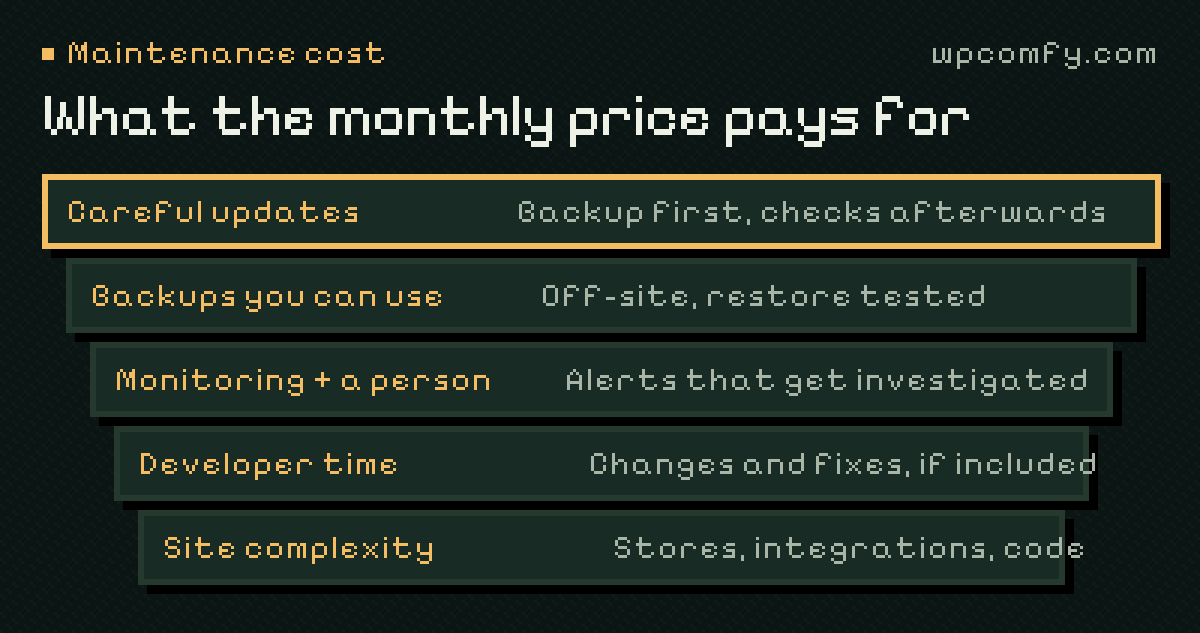
What drives the cost
The price of a maintenance plan comes down to a handful of factors:
- How updates are handled. Blind automatic updates are cheap. Updates with a fresh backup, changelog review and checks afterwards take real time.
- Backups and recovery. Off-site storage, several restore points and a tested restore process cost more than a plugin writing zip files to the same server.
- Monitoring and response. An alert is automatic; someone investigating it is not.
- Developer time. Some plans include hours for changes and fixes; others quote everything separately.
- Site complexity. A WooCommerce store with payments, shipping and integrations needs more care than a brochure site.
What makes your site cheaper or more expensive to maintain
Two sites on the same plan can take very different amounts of work. When a provider reviews your site, these are the things that usually move the estimate:
- The number and quality of plugins. Forty plugins, several of them premium or rarely updated, need more attention than fifteen well-maintained ones.
- Custom code. A custom theme or bespoke features have no public changelog; someone has to understand them before updating around them.
- The update backlog. A site that hasn’t been updated for a year needs catching up first — often in careful stages.
- A page builder or a heavy theme. Major releases of builders can change layouts and need checking page by page.
- Integrations. CRMs, booking systems, payment gateways and marketing tools add journeys that need testing.
- Hosting. A host with staging, reliable backups and current PHP makes safe maintenance faster.
What cheaper plans often leave out
A low monthly price is often achievable because something is missing. Before choosing, check whether the plan includes:
- Checks of key pages and forms after updates — not just “the update completed”.
- Backups stored somewhere other than your hosting account.
- Fixing problems caused by the updates themselves.
- A human who looks at your site, not only a dashboard.
- A report that tells you what was done.
One-off costs versus the monthly fee
A fair quote separates recurring care from one-off work. Expect these to be priced separately:
- Onboarding or cleanup — clearing an update backlog, removing malware, fixing inherited errors before the regular routine starts.
- Repairs to existing problems — something that was already broken before care began.
- Migrations — moving to a new host or domain. Our guide to moving to a new host shows what’s involved.
- Larger projects — a redesign, a new section of the site, a major integration.
Keeping these apart protects both sides: the monthly fee stays predictable, and bigger work gets a proper estimate instead of disappearing into a vague retainer.
Costs that sit outside any maintenance plan
Some running costs belong to your website whoever looks after it. When you budget, include:
- Hosting, and the domain renewal.
- Premium plugin and theme licences — needed to keep receiving updates.
- Email delivery for forms and store notifications, if your host’s mail isn’t reliable enough.
- Any paid services the site depends on: booking, CRM, maps, fonts, a CDN.
The hidden cost of doing it yourself
Maintaining a site yourself isn’t free — it’s paid in time and risk. There’s the hour a week you (or a colleague) spend on updates, the premium plugin licences and backup storage, and the day it goes wrong and you’re searching error messages instead of running your business. For some teams that trade-off is fine. For many, it’s the reason a site stops being updated at all. We compare the options in more detail in care plan vs. freelancer vs. DIY.
How our pricing works
To make this concrete, here is how WPComfy plans are structured. Prices are monthly, per website, in EUR:
- Essential — €99: the maintenance routine (scheduled updates, daily off-site backups, uptime and SSL monitoring, a weekly check of one form, a monthly summary), with no included development hours.
- Care — €150: everything in Essential plus one support and development hour a month.
- Studio — €400: eight hours a month and a monthly analytics review with up to three recommendations.
- Commerce — €975: WooCommerce care, twenty hours a month and a purchase-flow check where a safe test setup exists.
Hosting isn’t included; a suitable current host can stay in place. You can see the details on our plans.
When a simpler plan is enough
Not every site needs developer hours. If your site rarely changes, has a modest list of well-maintained plugins and no store, a maintenance-only plan is often the right fit — you pay for the routine and quote the occasional change separately. Plans with included hours make sense when requests come in every month and waiting for a separate quote each time slows you down.
How to compare quotes
Put quotes side by side and ask each provider the same questions:
- What happens before and after an update?
- Where are backups stored, how long are they kept, and are restores tested?
- What does monitoring cover, and who responds to an alert — and when?
- How many developer hours are included, and what happens to requests that need more?
- What counts as extra work, and how is it estimated?
- What do you receive each month to show what was done?
A slightly higher price with clear answers is usually cheaper than a low price with surprises.
Frequently asked questions
Is WordPress maintenance a monthly cost?
Usually, yes. Updates, backups and monitoring are ongoing, so most providers charge a monthly fee. Some offer yearly billing, sometimes with a discount.
Does WordPress maintenance include hosting?
Not always. Some plans bundle hosting; others, including ours, keep a suitable existing host and quote managed hosting separately if you need it.
Why do WordPress maintenance prices vary so much?
Plans differ in what’s included: whether updates are tested, whether backups are off-site and restorable, whether a developer’s time is included and whether WooCommerce is covered. Two plans with the same name can be very different services.
Do I pay extra if an update breaks my site?
It depends on the provider. In our plans, fixing or rolling back a problem caused by an update we carried out is part of maintenance and doesn’t use your development hours.
Is there a setup fee for WordPress maintenance?
Many providers review a site before taking it on. If the site has a large update backlog, security problems or broken features, that cleanup is usually quoted once, separately from the monthly plan.